
Skip to content

Parent Portal

Collection information, always available to families

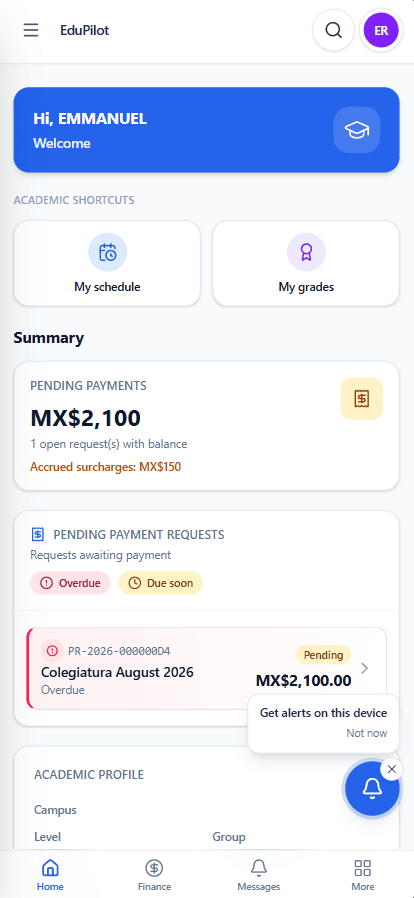
Parents, guardians and students can view balances, payment concepts, due dates and payment status through EduPilot while the school keeps collection information centralized within the same process.

EduPilot mobile app. Parent Portal.

Clear information for families and better visibility for the school

EduPilot makes financial information available to both the people making the payment and the team managing collections.

School administrator reviewing information at her desk

For the school

Keep collections and follow-up in one connected flow

Quickly identify who has outstanding payments, track upcoming and overdue balances, reconcile payments more easily, and monitor your school’s collection performance in real time.

  • Centralized financial information
  • Due dates
  • Payment status
  • Follow-up from the same platform

The same information

Parent and child reviewing information on a phone

For families

Access your information when you need it

Parents, guardians and students can see what's outstanding, when it's due and which payments have already been recorded.

  • Outstanding charges
  • Upcoming due dates
  • Payment history
  • Payment status

Everything important about payments, in one place

Families can access the student's financial information directly from EduPilot.

  • 01

    View balances and charges

    See outstanding payment concepts and the corresponding balance.

  • 02

    Check due dates

    View upcoming payment deadlines.

  • 03

    Review payment history

    Keep previously recorded payments accessible.

  • 04

    Check payment status

    See whether a payment has been recorded or is still awaiting review.

Report a payment directly through EduPilot

After making a payment, families can report it through their portal and attach the payment receipt for the administrative team to review.

  1. 1

    Make the payment

    The family completes the payment using the school's corresponding payment method.

  2. 2

    Report it

    Register the payment in EduPilot and attach the receipt.

  3. 3

    Administration reviews

    The administrative team reviews and validates the information.

  4. 4

    Status is updated

    The family can later check the payment status in EduPilot.

Access EduPilot wherever it's most convenient

Families can use EduPilot through a web browser or the mobile app. Installing the app is optional; the parent portal is also available on the web.

Web portal

Access financial information through a supported browser.

Mobile app

Access EduPilot directly from a mobile device using the EduPilot app.

Give families a clearer collection experience

See how EduPilot's Parent Portal can become part of your school's collection process and keep financial information available to families.